Ninety days of content from one photo session appears on nearly every photographer’s sales page. It’s the standard promise. It’s also, for a session that costs thousands of dollars, a fairly thin return.
The claim is testable in either direction. You need a certain number of images, a certain variety of images, and a set of tools that turn each image into a caption, a post, an email, a page. Two of those three are decided at the shoot. Only one of them is AI.
What follows is a review of the whole stack, including the parts that fail.
The short answer
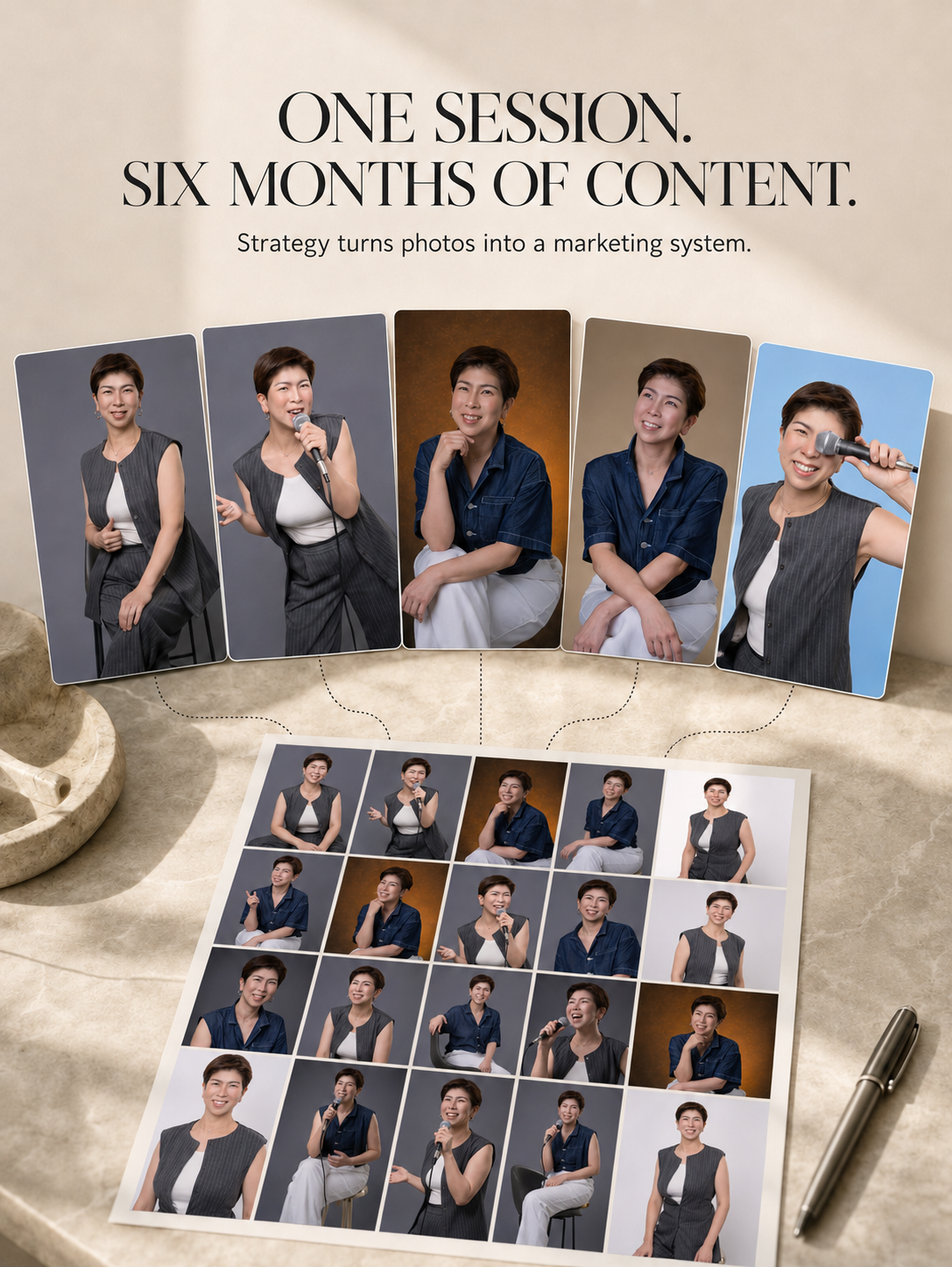
Yes, one brand photo session can carry 6 months of content, and AI tools make the writing part fast. The photos still have to be planned for it. A session shot as outfit variations runs dry in a couple of weeks. A session shot across the arc of your business carries half a year.
Why 6 months and not 90 days
Run the return on a session that costs what a real brand session costs.
Divide what you paid by the number of pieces the gallery actually produced. At 90 days you’re dividing by roughly 50. At 6 months you’re dividing by roughly 100. Same invoice, half the cost per piece.
That’s the whole argument for planning the longer horizon at the shoot instead of discovering in April that you shot for January.
The 90-day number came from somewhere real. A quarter is how long content planning feels manageable, so a quarter is the window everyone quotes. But it’s a habit borrowed from calendars, and it sets an expectation that your images have a 3-month shelf life. They don’t, if you shoot for range.
What does repurposing one photo session into 6 months of content actually mean?
It means one shoot produces the visual supply for roughly 80 to 130 published pieces across half a year, not 180 separate posts.
Do the math on a normal cadence. Three to five posts a week across LinkedIn, Instagram, and a newsletter lands between 78 and 130 pieces in 26 weeks. Every one of those pieces needs an image, and most images can carry more than one job: a feed post in January, a carousel slide in February, an email banner in April, a section on your services page the whole time.
The number of images matters less than the variety. Forty photos of the same person in 4 outfits against 3 backdrops is one story told 40 ways. Forty photos taken across a working day, with clients, at a desk, teaching, walking into a building, hands on the actual work, is 40 stories.
That distinction decides whether the 6-month plan survives past week 3.
Does AI really save time on content creation?
The time savings are real and they are larger than most people expect. In HubSpot’s 2026 State of Marketing report, built on responses from more than 1,500 global marketers, about a third said AI tools save their team 10 to 14 hours a week, and another third said more than 15 hours. Content creation was the top area of extensive AI use, at 42.5 percent.
Put that next to how much time the work takes today. Small business owners spend about 6 hours a week on social media on average, according to 2025-2026 data from LocaliQ, the SBE Council, and VerticalResponse. Content creation eats the largest share of it.
The repurposing numbers are stronger than the raw time numbers. HubSpot data compiled in the 2026 content repurposing roundup found 60 percent of marketers say repurposed content generates more leads than original content, and 94 percent of marketers who repurpose say it raises the ROI of their content.
So the tools work. The interesting question is what they work on.
What the AI tools got right
The blank page problem disappears, and that is most of the battle.
For my clients the post-session toolkit is a Canva template suite plus 8 named AI experts: Leo for bios, Sonia for social media planning, Carter for content repurposing, Marta for email campaigns, Megan for website copy, Petra for PR and media kits, Luca for VSL scripts, Kane for keynotes. Each one is built around a single job.
Three things hold up well:
- Format translation. One idea becomes a LinkedIn post, an Instagram caption, and an email in a single sitting. Doing that by hand is the part that makes people close the laptop.
- Volume without decision fatigue. A planning tool that hands you 6 months of topics removes the daily question of what to post, which is the question that kills consistency.
- Reuse mapping. Pairing a specific photo with a specific message, on a specific platform, is exactly the kind of tedious matching a machine does better than a tired founder at 9pm. Over 6 months this matters more than it does over 90 days, because keeping track of what you’ve already used is the part humans give up on first.
The Canva templates matter more than they sound like they should. LinkedIn headers, Instagram covers, carousels, Facebook covers, email signatures, webinar slides, letterheads. Every one of those is a place a photo can go to work, and every one of them is a place most galleries never reach.
Where the AI tools fell apart
Three failure points, in order of how often they come up.
The first is missing brand clarity. Feed an AI tool no ideal client and no brand voice, and it writes to nobody in particular in a register that belongs to nobody in particular. The output is grammatical and empty. A health coach who called me for two headshots hit this exact wall. By the strategy meeting the realization landed: her ideal client had never been defined at all, only the work itself, never the person it was for. Once we built the ICA together, every photo from the shoot had a job, and the marketing tools finally had something to write toward.
The second is missing visual supply. AI cannot generate a photo you did not take. When a session is shot as outfit variations, the plan holds for about two weeks and then every post starts to look like the last one. The audience notices before you do.
The third is voice. Tools trained on the internet write like the internet. Without a defined voice to work from, the captions come back sounding like a brochure, and the founder stops posting because reading them makes her wince.
None of these three is an AI problem. All three are decided before the camera comes out.
How many photos do you need for 6 months?
Plan for 8 to 12 distinct scenarios. The number doesn’t double when the calendar does, and the reason is worth understanding before you book a longer shoot than you need.
A scenario is a situation your business actually contains: a client consultation, a workshop, a walk to a meeting, close-up hands on the tools of your trade, a laughing moment between takes, a quiet portrait against a wall that matches your brand colors. Each scenario yields multiple usable frames at different crops and orientations, which is what lets one moment run as a vertical Reel cover, a square feed post, and a horizontal website banner.
Three practical rules from planning these sessions:
- Shoot verticals on purpose. Most galleries are horizontal-heavy, and most content today is vertical. A gallery that cannot fill a phone screen loses half its useful life.
- Include the unglamorous frames. Your desk, your notebook, your hands, the back of your laptop. Those become the images you reach for on the days you do not want your face on the internet, and they keep the calendar moving.
- Leave negative space in a handful of frames. A photo with room above your head or beside you becomes a LinkedIn header, a webinar slide, or a quote graphic. A perfectly filled frame becomes one thing forever.
Wardrobe follows the same logic. Three outfits across 8 scenarios reads as 6 months of a business in motion. Eight outfits against one wall reads as one afternoon, and your audience does the math without meaning to.
How 8 to 12 scenarios stretch to 6 months
Reuse is the mechanic that makes the second quarter work, and almost nobody plans for it.
An image you posted in January and post again in May is a new image to most of your audience. Instagram’s organic reach means somewhere between 5 and 10 percent of your followers saw it the first time. The people who did see it were scrolling, and they saw it for about a second. A 4-month gap is longer than social media memory.
Three things make the reuse invisible:
Crop it differently. The same frame cropped tight on your face in month 1 and wide with negative space in month 5 reads as two photographs. This is why the shot list includes room around you.
Change the job. A photo that ran as a feed post in February works as an email header in June, a slide in a webinar deck in July, and a background on your services page continuously. Same file, different context, no repetition felt.
Change the message. The photo of you mid-sentence at a workshop can carry a post about teaching, a post about a client win, a post about why you changed your offer, and a post about the thing you got wrong in year two. The image is evidence. The message is what varies.
The practical rule: build a simple usage log. One column for the image, one for where it ran, one for the date. Month 4 is when you’ll need it, and month 4 is when you’ll wish you’d started it in month 1.
The one thing that breaks at 6 months
Season. This is the honest limit of a longer plan.
Shoot in January in a coat and you’ll be posting winter clothes in July. Your audience won’t consciously clock it, but the images stop matching the moment, and you’ll feel it before they do.
Two fixes, both decided at the shoot. Shoot layers you can remove, so the same location gives you a jacket set and a sleeveless set. And weight the neutral frames, the ones indoors, close-cropped, or against a plain wall, where season doesn’t read at all. Those are the images that carry months 4 through 6.
Hair is the other one. If you’re planning a significant change, shoot after it, not before.
Why the photos have to be real
Consumer patience for machine-made imagery is thinner than the tech coverage suggests. A Gartner 2026 marketing survey found 50 percent of U.S. consumers would prefer to give their business to brands that do not use generative AI in consumer-facing messages, advertising, and content. Getty Images research puts the share of consumers who want disclosure when an image is AI-generated at nearly 90 percent.
For a personal brand, the calculation is simpler than it is for a product company. Your face is the product. A prospect who discovers your headshot was generated has learned something about your judgment before you ever speak.
Using AI to write around real photographs sits in a different category entirely. The photograph is evidence. The AI is the assistant that gets the evidence in front of people more often.
What a 6-month plan looks like in practice
Step 1. Sort the gallery by job, not by favorite. Website images, LinkedIn images, feed images, story images, email images. Most people sort by which photos they like best, which is why the same 6 get used forever.
Step 2. Pick your pillars. Four themes you can talk about for half a year without repeating yourself. Match each pillar to the scenarios you shot. Four is the number that holds at this length; three starts to feel thin around month 4.
Step 3. Batch the writing in two sittings per quarter. Thirty captions in one afternoon with a tool that knows your voice is a completely different task from one caption a day for thirty days. Four sittings across 6 months covers the whole run.
Step 4. Schedule 6 weeks out, then leave room. The best-performing post of your half-year will be something that happened on a Tuesday and you will want the slot.
Step 5. Review at day 90. Cut the pillar nobody engaged with, and reshoot nothing. You have the images. This is also where you check the usage log and start deliberately recycling the strongest frames into new jobs.
Is repurposing with AI worth it? An honest verdict
Worth it, with one condition that decides everything.
The AI layer is the cheapest and most reliable part of this whole system. It saves real hours, the data backs it, and it removes the specific friction that stops most founders from posting at all. As a review of the tools on their own, this is a strong yes.
The condition is that the tools inherit whatever you feed them. Brand clarity and a gallery with range, and 6 months is conservative. Neither one, and you have bought a very fast way to produce content nobody asked for.
That is why the strategy meeting comes before the shoot in my process, and why the shoot comes before anyone touches a marketing tool. The order is the product.
Scored honestly, across the three parts: the writing tools earn a 9, because they do one job and do it fast. The template library earns an 8, because it puts photos in places most people never think to use them. The strategy underneath earns whatever you put into it, and it is the only score that moves the other two.
Frequently asked questions
Can one photo session really last 6 months?
Yes, if it was planned for it. The limit is variety of situation, not number of files. Eight to 12 distinct scenarios shot across the arc of your working day will carry half a year, because each scenario produces multiple frames at different crops, and a photo republished 4 months later reads as new to an audience that saw it once while scrolling. A session shot as outfit changes against one wall runs out in about two weeks regardless of how many frames you got.
Can AI write social media captions that sound like me?
Only if you give it a voice to copy. Tools work from what you feed them, so a defined brand voice document, a few writing samples, and a clear ideal client change the output completely. Without those, captions come back generic and polished in a way that reads as machine-written to anyone who knows you.
How many photos do I need for 6 months of content?
Plan for 8 to 12 distinct scenarios rather than a target number of files. Each scenario produces multiple usable frames at different crops, which is what lets one moment work as a vertical Reel cover, a square feed post, and a horizontal banner. Variety of situation matters far more than raw image count, and it’s what makes the back half of the calendar possible.
Should I use AI-generated headshots instead of a real session?
Not for a personal brand. A Gartner 2026 survey found 50 percent of U.S. consumers prefer brands that keep generative AI out of consumer-facing content, and Getty Images research puts consumer demand for AI image disclosure near 90 percent. Your face is the product, so the trust cost outweighs the savings.
What is the difference between a photo gallery and a brand engine?
A gallery is files. A brand engine is files plus the templates, the plan, and the tools that put them to work. My clients leave with a Canva template suite and 8 AI marketing experts covering bios, social planning, repurposing, email, website copy, PR kits, VSLs, and keynotes, so the images keep working after delivery.
How long does the whole process take from call to content?
The phone consultation happens first, then an in-person or Zoom strategy session to define the ideal client, the brand voice, and the full shot plan. The shoot follows, then we select images together, and the retouched gallery arrives with the marketing suite. Publishing can start the day the images land.
Ready to build the gallery your calendar can actually live on
Six months of content is a supply problem before it is a writing problem. Get the strategy right, shoot the range, and the AI layer does exactly what it promises.
Book a call at gabyclark.com and we will map what your business needs to photograph.
About the Author: Gaby Clark